Live Event Equipment Rental Checklist for 2026
Quick Summary
An event equipment rental covers the audio, lighting, video and staging gear your event needs, and planning starts with a written event brief before any quote is requested. Build checklists for each system, confirm power and backup plans, and reconcile the gear against the rental manifest when it is returned.
- Write your event brief first: attendance, content, location, load-in timing and operators.
- Audio checklists should cover main PA, wireless mics with backups, and playback sources.
- Calculate total electrical load from each device's label, then add a safety margin.
- Get a signed condition report on arrival and photograph serial numbers.
- Reconcile every cable and stand against the rental manifest before the crew leaves.
Table of Contents
- Start With Your Event Requirements Before You Book Any Gear
- Audio Equipment Checklist for Live Events
- Lighting, Video and Staging Items to Confirm
- Power Distribution, Cabling and Backup Planning
- Writing a Technical Rider Template for Local Bands
- Event Production Equipment Rental Best Practices
- Booking Your Production Walkthrough With AudioBahn Productions
- Frequently Asked Questions
Live Event Equipment Rental Checklist for 2026
Last Updated: November 4, 2026
Start With Your Event Requirements Before You Book Any Gear
Event production is growing, and the market for event equipment rental is growing with it. More rental companies means more choices, and more ways for a booking to go wrong.
Planners often start by asking what gear to rent instead of asking what the event needs to do.
Write those answers down before you request a single quote. A clear event brief makes it easier to compare event production services and avoids paying for gear you will never use from an event equipment rental provider.
Audio Equipment Checklist for Live Events
Audio is the component most likely to be noticed when it fails, so build this list first. Confirm each item against your event brief:
- Main PA system sized for the room, measured in coverage and loudness rather than speaker count
- Subwoofers, if music or bass-heavy content is planned
- Mixing console with enough channels for every input, plus spares
- Wireless microphones, with a backup for each primary mic
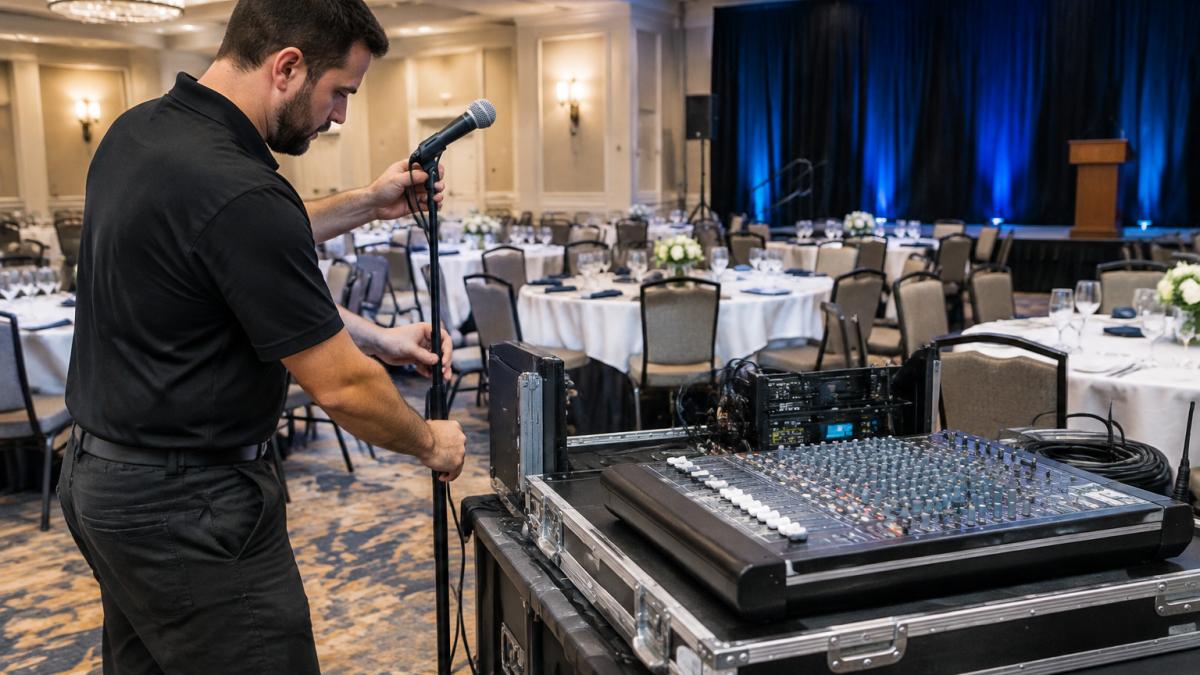
A crew member setting up a mixing console and microphone stands before guests arrive shows what a well-planned audio load-in looks like. Wireless equipment deserves special attention. Confirm frequency coordination with the venue before the event, because interference from other wireless systems is a common cause of dropouts.
Ask for a written quote that lists each item separately.
Lighting, Video and Staging Items to Confirm
Lighting and staging define the space. Confirm these items with the venue and your event equipment rental provider:
- Lighting fixtures matched to the stage size and mounting points
- Lighting control console or preset plan
- LED video panels or projectors, with lumen output suited to ambient light in the room
- Video switcher and cabling for live feeds or presentations
Rigging and staging require the venue's written approval in most cases. Ask about weight limits, ceiling points and any inspection requirements before you finalize the design. A simple lighting plot and stage plan shared with every vendor prevents most day-of confusion.
Power Distribution, Cabling and Backup Planning
Power problems cause more event disruptions than most people expect, and they are almost always preventable with a written plan built alongside your event equipment rental. Build the power plan before you finalize lighting, video or staging, because every one of those decisions changes the electrical load.
Step 1: Calculate the real load
List every powered device and its wattage or amperage draw from the manufacturer's label, not from memory. Add lighting fixtures, video walls, projectors, audio amplifiers, backline, laptops, chargers and any catering or climate equipment the venue is supplying.
- Total electrical load calculated from every powered device, with a safety margin
- Circuits identified and confirmed with the venue, including which are dedicated
- Distro boxes, breakers and cable runs labeled by circuit
- Grounding confirmed for audio and video gear to avoid hum and buzz
Watch out: a circuit that looks dedicated on the venue's panel schedule may share a leg with kitchen or HVAC equipment, so ask the facility manager to walk the panel with you rather than trusting the label.
Step 2: Separate clean power from dirty power
Audio and video gear is sensitive to voltage dips and noise from motors, dimmers and compressors. Where possible, put audio and video on their own circuits away from lighting dimmers and catering equipment. If the venue cannot provide separate circuits, a power conditioner or isolation transformer on the audio feed is cheap insurance against hum and dropouts.
Step 3: Engineer redundancy for critical systems
For critical events, plan redundancy at three layers: power, signal and source. A backup microphone, a second playback device and a spare power path can turn a failure into a short pause instead of a canceled program. Ask your provider which components they will bring as spares and which ones depend on the venue, and write the answer into the quote.
- Backup power or a second signal path for critical systems
- Spare microphone and XLR cable runs for every stage position
- Second playback device loaded with the same content
- Documented failover procedure the on-site crew has rehearsed
Step 4: Plan the de-rig and power-down
Power planning does not end at load-in. Confirm who kills circuits, in what order, and when, so gear is not unplugged mid-showdown or left live overnight. Label every cable and distro run at load-in so the de-rig crew can coil and count it against the rental manifest the same night. This is the step most guides skip, and it is where hidden damage and overage charges are usually discovered.
Writing a Technical Rider Template for Local Bands
A technical rider is the document a performer or band sends to a venue or promoter. It lists exactly what the act needs on stage.
Here is a simple template you can adapt:
Technical Rider: [Band Name] Contact: [Name, phone, email] Stage size needed: [Width x depth] Audio: [Number of mics, DI boxes, in-ear monitors or wedges] Lighting: [Number of fixtures, color needs, special effects] Backline: [Drum kit, amps, keyboards, other instruments] Power: [Number and type of outlets needed on stage] Load-in window: [Time and access details] Soundcheck time: [Minutes needed]
Local bands often skip this document or write it vaguely. A short, specific rider prevents mismatched equipment and wasted soundcheck time. Share the completed rider with your event equipment rental provider as early as possible.
Event Production Equipment Rental Best Practices
Working with an event equipment rental company goes better when you follow a few habits. The list below goes beyond the basics to cover the two phases most planners underplan: accessibility compliance and the return side of the rental lifecycle.
Lock down the paperwork before load-in
- Request a written quote with every item listed. Bundled pricing without detail makes comparison difficult and hides substitutions.
- Confirm delivery, setup and strike times in writing. Ask who is on site, when, and what they are authorized to do.
- Ask for an inspection before the event. Many providers will test equipment with you in advance.
- Get a signed condition report on arrival. Photograph serial numbers and any existing damage so you are not billed for it later.
- Confirm insurance and liability terms. Know who is responsible if gear is damaged, and what the replacement terms are.
Build in accessibility from the start
Accessibility is the gap most rental checklists miss, and it is increasingly expected by corporate, school and public-sector clients. Confirm these items with your event equipment rental provider and the venue:
- Assistive listening system (hearing loop or FM/IR system) for the main room
- Open or closed captioning hardware and a display path for any streamed or recorded content
- ASL interpreter sightlines and a lit stage position if interpretation is planned
- Accessible routes to stage, backline and control positions, not just to seating
Watch out: captioning and hearing-loop gear often needs to be ordered as a separate line item, so raise it at quote time rather than the week of the event.
Plan the return and inventory reconciliation
The return phase is where planners get surprised by damage fees and overage charges. Treat de-rig as a scheduled task with its own checklist:
- Count every cable, stand, fixture and adapter against the rental manifest before the crew leaves
- Photograph the gear as it is packed, especially anything that was handled roughly
- Note any damage on the condition report at return, not days later
- Confirm who is responsible for return shipping or pickup and when it happens
A short reconciliation meeting with your provider the day after the event closes most disputes before they start. Ask your provider in advance how they handle missing or damaged items, and get that answer in writing alongside the quote.
The table below summarises the key paperwork and return-phase checks covered in this section.
| Phase | Action | Why it matters |
|---|---|---|
| Before load-in | Request written quote listing every item | Makes comparison easy and hides no substitutions |
| Before load-in | Confirm delivery, setup and strike times in writing | Clarifies who is on site and when |
| Before load-in | Get a signed condition report on arrival | Avoids being billed for existing damage |
| Before load-in | Confirm insurance and liability terms | Defines responsibility if gear is damaged |
| Return | Count every item against the rental manifest | Catches missing gear before the crew leaves |
| Return | Note any damage on the condition report at return | Prevents disputes over damage found later |
| Return | Reconcile the final invoice line by line | Closes billing disputes before they start |
Booking Your Production Walkthrough With AudioBahn Productions
Once your event brief is written, the next step is a site-specific plan. At AudioBahn Productions, we offer a free walkthrough and evaluation of your existing system, so you know exactly what your event equipment rental should cover. We recommend only the upgrades your event needs.
We serve the Michiana region and can support events across a wide area, with audio, lighting and staging as our core services and expanding event logistical support available as well. Get a free quote for your next event, or review our event production services to see what we provide.
Frequently Asked Questions
How far in advance should I book live event equipment?
Book as early as your date is firm. Popular dates in peak seasons fill quickly, and early booking gives you more time to confirm the technical details with the venue.
Do I need to rent backup equipment?
For critical sessions such as keynotes, ceremonies and live broadcasts, a backup microphone and a second signal path are strongly recommended. Ask your provider what spares they include.
Who is responsible if rented equipment fails during an event?
Responsibility depends on your contract. Review the liability, insurance and replacement terms before signing, and ask how quickly the provider can respond on the day of the event.
Frequently Asked Questions
What equipment is essential for a professional live event production?
A professional live event production usually needs a sound system sized to the room, a mixing console, wired and wireless microphones, stage lighting with control, staging or risers, power distribution with backup, and cabling sized for the load. The exact list depends on the event format and venue. Confirm each item against the event schedule and the room's capacity before you sign a rental agreement, and ask the provider to walk the space if the setup is complex. A written checklist that matches the run-of-show prevents gaps on the day.
How far in advance should you book event equipment rentals?
Book as early as the date and budget allow, especially for weekend dates, holidays and peak seasons such as spring graduations and wedding months. Provide the final headcount, load-in time, and technical requirements when you request the quote, since availability changes as dates fill. Pricing depends on quantity, dates and delivery, so request a current quote from AudioBahn Productions rather than relying on older estimates. Confirm the reservation in writing with a signed agreement.
What should be included in a technical rider for local bands?
A technical rider for a local band should list the input channel count, microphone and DI box requirements, monitor needs, stage plot, lighting preferences, power needs, load-in window and a contact for the production manager. Include any backline the band expects the venue to provide, and note what the band brings. Share the rider with the sound provider well before the show so the team can confirm gear and crew, and revise the document after each rehearsal.
How do I choose the right AV rental company for my event?
Look for a company that asks detailed questions about your event before quoting, offers a site walkthrough, and can explain how it handles equipment failure during a show. Ask who coordinates scheduling, payments and contracts, and whether the same team will be on site. Request references for similar events, and compare what each quote includes, such as delivery, setup, technicians and removal, rather than comparing headline numbers alone.

Sound, lighting, staging and LED video. Free quote.
Frequently Asked Questions
What equipment is essential for a professional live event production?
A professional live event production usually needs a sound system sized to the room, a mixing console, wired and wireless microphones, stage lighting with control, staging or risers, power distribution with backup, and cabling sized for the load. The exact list depends on the event format and venue. Confirm each item against the event schedule and the room's capacity before you sign a rental agreement, and ask the provider to walk the space if the setup is complex. A written checklist that matches the run-of-show prevents gaps on the day.
How far in advance should you book event equipment rentals?
Book as early as the date and budget allow, especially for weekend dates, holidays and peak seasons such as spring graduations and wedding months. Provide the final headcount, load-in time, and technical requirements when you request the quote, since availability changes as dates fill. Pricing depends on quantity, dates and delivery, so request a current quote from AudioBahn Productions rather than relying on older estimates. Confirm the reservation in writing with a signed agreement.
What should be included in a technical rider for local bands?
A technical rider for a local band should list the input channel count, microphone and DI box requirements, monitor needs, stage plot, lighting preferences, power needs, load-in window and a contact for the production manager. Include any backline the band expects the venue to provide, and note what the band brings. Share the rider with the sound provider well before the show so the team can confirm gear and crew, and revise the document after each rehearsal.
How do I choose the right AV rental company for my event?
Look for a company that asks detailed questions about your event before quoting, offers a site walkthrough, and can explain how it handles equipment failure during a show. Ask who coordinates scheduling, payments and contracts, and whether the same team will be on site. Request references for similar events, and compare what each quote includes, such as delivery, setup, technicians and removal, rather than comparing headline numbers alone.